 ShowRevue
Camera + audio, one file
Record the wide shot, your programme feed and two more audio tracks, with LTC on a fourth track, all locked together in one file.
ShowRevue records the video, up to three audio tracks, LTC on a fourth and every cue into one file. Search for a cue, replay the exact moment, and fire the cue back to the desk.
macOS 14+ · Apple Silicon recommended · Releasing soon
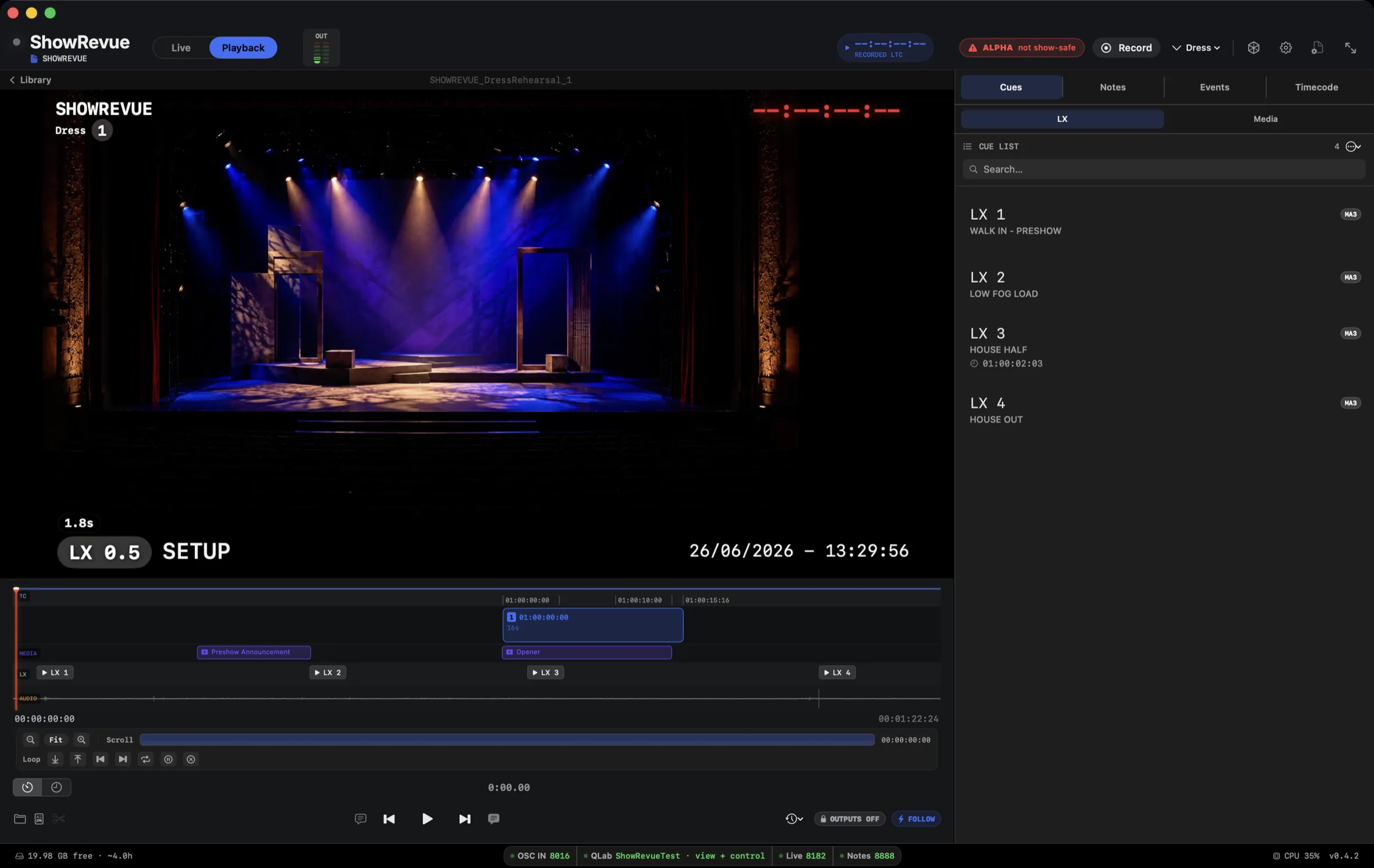
Frame by frame, forwards or back.
Every cue, at the frame it fired.
Video, audio, lighting and MIDI on one timeline.
Flag problems and notes the moment they happen, pinned to the exact frame.
Clips, cue lists and reports, out the door.
What it does
ShowRevue is a show recorder for theatre on Mac, and it handles rehearsal recording too. It records the tech rehearsal, the dress and every show with every cue attached: the stage camera, up to three audio tracks and LTC timecode on a fourth, with each lighting, QLab and media cue stamped on the recording as it fires. Notes from phones, tablets and the lighting desk land on the same timeline. In playback you search for a cue by name or number and seek straight to it, then fire the cue back to the desk to rebuild the state. When the run ends it writes a session report PDF with running times, cue snapshots and every note.
Record the wide shot, your programme feed and two more audio tracks, with LTC on a fourth track, all locked together in one file.
Catch what just happened while the take keeps rolling. Jump to a cue and scrub it frame by frame, audio and all.
Any phone, tablet or laptop is a notepad, on the house Wi-Fi or over the cloud. The whole team notes together, live, stamped to timecode and tagged by department. Theatre Mode goes full black with a red readout so you keep your night vision in a blackout.
Send LX or media cues to the console as the video plays, so the stage matches the recorded state without you touching the desk.
A one-glance Show-Ready check: camera and resolution, timecode locked, signal on every audio track, consoles talking, servers up, disk free. It also catches the quiet traps, like a zoom crop left on, two services on one port, or no main cue list picked.
Drill your calls against a real take. Hide the video and call Standby and GO by ear against the cues that actually fired. Every call is graded early, on time or late, with a scorecard and a PDF to prove it.
Drop in your MVR rig (or build the stage in the app), bind your PSN or BlackTrax trackers, and watch automation and tracking replay in sync with the video. You get a shout if anything breaks a safe zone.
Always grab the camera at full res and record at HD, then punch in up to 4× and pan around. A tighter shot with no second lens, still sharp. Scroll or pinch the preview to zoom; drag to reframe.
Crash-safe writing that survives a power yank, plus an optional live mirror to a second drive, so one disk dying mid-show doesn't take the whole run with it.
The file is a bog-standard MP4* anyone can open. Pop it back into ShowRevue and every cue, note and bit of metadata is right there to jump to.
Records and plays back timecode in sync with the video (LTC, MTC / MIDI, Art-Net and ETC sACN), so you stay locked to the desk.
Live timecode, the current cue and notes on your phone. On iPad there's a Director view big enough to call the show from. It finds the Mac on the house Wi-Fi and connects to it directly: timecode lands in around 30 milliseconds, and the app shows you the number. Out of the building it switches to the cloud.
Export each named timecode block as its own video file, programme audio on the left and LTC on the right. That's the layout cue-building apps like Cuepoints expect. Block names are stored with the show, so the next rehearsal exports the same set.
Type a cue number and land on the moment that lighting or media cue fired, instead of scrubbing through hours of footage.
Stage Display puts live cue state, timecode and a camera feed on any screen in the building over the LAN. Fire a half-hour, beginners or evac message to the whole house in a tap.
Hit a macro, type, done. The note is frame-stamped to timecode and shared with everyone. No reaching for the iPad, no breaking focus.
Send the session's notes, with timecode and time since the cue, as a PDF or straight to your inbox the moment the run ends.
Automatic show and rehearsal reports with run-of-show timing: act, interval and total, plus how far you ran off your target times. Ready for the production meeting, the remount or the tour.
Pick any two recordings of the same show and see what moved: running times act by act, cues added, dropped or shifted, which notes are still open and which are cleared, and any technical incidents. Is the show tightening up, or drifting?
The Director view is a clean, big-text layout (live or playback feed, timeline and cue navigation) sized for whoever's watching or calling rather than driving the desk. Step through cues and drop notes from the keyboard.
Scribble straight on a note's snapshot: circle the late entrance, arrow the dead lamp. Vector strokes replay over the moving video at the cue, from the Mac or any device (yes, PCs too).
* H.264 / H.265 record to a standard MP4. ProRes LT records to a MOV with a sidecar metadata file.
Lighting console integration
ShowRevue takes cue data live from grandMA3 and ETC Eos over OSC, and from grandMA2 over MIDI Show Control. No middleware, no bridge app.
Media server integration
ShowRevue takes cue data straight from your media server and can fire cues during playback. Running QLab 5 cues show progress bars in the cue list.
Hardware
Built for your role
Stage Display · backstage monitor
Stage Display is a live web page with the show's current cue, running timecode and stage camera, and any display on the venue network can show it. Use it as a show relay or backstage monitor: point a dressing-room monitor, a foyer screen or a digital-signage player at the URL.
Stage Display is a single URL on the venue network. Open it in any browser: no app, no install, no extra hardware.
The cue that just fired, what's coming next and the running timecode, updating live on every screen.
The wide stage view streams to every connected display over the LAN, so back-of-house always sees the room.
Push half-hour, beginners, evacuation, and department notices to every screen in the building at once.
Drive a screen any way you like: straight off the Mac's HDMI, or any signage player you already run
Workflow
Point ShowRevue at your desk and timecode. It records video, multitrack audio and LTC, and grabs every LX, QLab and media cue as it fires, so nobody logs cues by hand.
Anyone drops a timestamped note from a phone, the lighting desk or the app. It's tagged by department, carries a snapshot and is locked to the frame, and the whole team sees it land live.
In playback, hop to any cue or note and replay the exact moment in sync. Fire LX or media back to the desk and QLab to match what was recorded.
An automatic session report with the notes, cue snapshots and act and interval times, plus one clean record for remounts, tours and the long-term archive.
FAQ
Both. ShowRevue is a show recorder that also works as a rehearsal recorder. It records your tech, your dress and every show, with each cue and note on the same timeline. Set the session type to Show and it records show-safe.
grandMA3 and ETC Eos send their cues to ShowRevue over OSC, and ShowRevue can fire cues back to them in playback. grandMA2 cues come in over MIDI Show Control. On the playback side it works with QLab 5, Millumin, Pixera and disguise.
A Mac running macOS 14 Sonoma or later. Apple Silicon (M1 or later) is recommended, with 8 GB of RAM as a minimum and 16 GB for long sessions with multitrack audio. Allow 100 GB or more of free disk for a full tech day.
Yes. LTC is recorded as its own audio track (always track 4, next to up to three tracks of show audio) and plays back locked to the video. ShowRevue can also follow MIDI timecode, ETC sACN and Art-Net timecode.
Live Notes serves a web page on the venue network, so any phone, tablet or laptop opens it in a browser with nothing to install. Each note is stamped to timecode, tagged by department and lands on the recording at that moment. Away from the venue network, notes can go through the cloud instead.
Yes, with Stage Display. It is a web page on the LAN showing the cue that just fired, what's next, the running timecode and the stage camera, so any browser, smart TV or signage player can be a backstage monitor. The SM can also send half-hour, beginners and evacuation calls to every screen at once.
A PDF with the running time of each act, the interval and the total, worked out from the cues you mark as show start, interval and show end. It also lists the lighting cue lists and every note, with stage snapshots taken 2 seconds after a lighting cue fires (adjustable; in a quick sequence it waits for the last cue). It is ready to go out as the show report or rehearsal report.
No. H.264 and H.265 recordings are standard MP4 files that open in any player, with the cue and note data embedded inside. ProRes LT recordings are MOV files with a sidecar metadata file. Open either in ShowRevue to get the cue list and notes back.
Yes. The free Viewer plays any recording, follows a live ShowRevue show and joins a cloud show as a team member, but it doesn't record. Each Mac can run a free 14-day Professional trial once, with no card. After that, Base records your show with desk cues and LTC, Professional adds firing cues back to the desk, QLab and media servers, and Max adds Stage Display and hosting a cloud show for your team. During the private beta every tester gets the full app.
Yes. When a session is set as a Show, Stop becomes hold-to-stop and no cue commands go out to the console while it records. The Output Audit Trail logs anything ShowRevue sends, and anything the lock blocked.
Releasing soon · macOS
The private beta is closed to new testers. Leave your email and we'll tell you the day ShowRevue is out for macOS 14 or later.
MACOS · RELEASING SOON